
How to Get Zelda & Splatoon Amiibo Items in Animal Crossing: New Horizons 3.0
Scan a compatible Zelda or Splatoon amiibo, then buy the unlocked items from Nook Shopping → Special Goods → Promotion. Includes prices, compatible figures, and fixes.
Quick Answer
- Update to Ver. 3.0: The Zelda and Splatoon catalog rewards require Animal Crossing: New Horizons Ver. 3.0 or later.
- Scan at Nook Stop: Use Invite a Camper and scan one compatible Zelda or Splatoon amiibo.
- Open the Promotion tab: Go to Nook Shopping → Special Goods → Promotion.
- Order the items: Buy the unlocked items like normal catalog items, then check your mail after delivery.
You do not need to move in Tulin, Mineru, Cece, or Viché to unlock the shopping items.
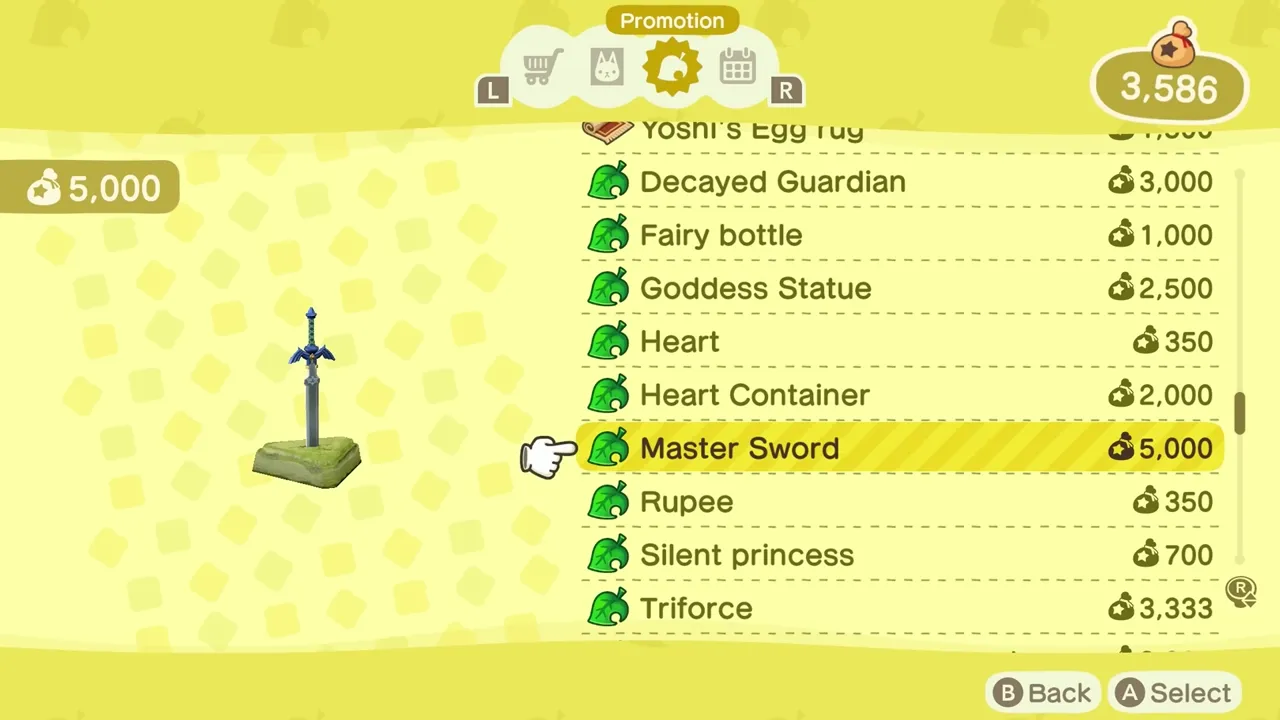
Animal Crossing: New Horizons 3.0 adds Zelda-inspired and Splatoon-inspired catalog items that unlock after a compatible amiibo scan. The important detail is that this is a Nook Shopping unlock, not a villager move-in requirement.
That distinction matters because Tulin, Mineru, Cece, and Viché can visit through amiibo, but you do not need to complete the campsite move-in loop before checking the shopping catalog.
What the Scan Unlocks
For the shopping items, the invited villager is not the important part:
- One compatible Zelda figure unlocks the full Zelda item set.
- One compatible Splatoon figure unlocks the full Splatoon item set.
- You do not need to move in Tulin, Mineru, Cece, or Viché.
- The items are in Nook Shopping → Special Goods → Promotion. Scroll through the Promotion tab if you do not see them immediately.
- Nook Shopping still uses its normal five-item daily order limit, so a full 28-item set takes multiple days to buy.
What You Need First
Before looking for the items, make sure these basics are true:
- Your game is updated to Animal Crossing: New Horizons Ver. 3.0 or later.
- Resident Services is upgraded and the campsite amiibo flow is unlocked.
- You have a compatible The Legend of Zelda or Splatoon amiibo figure.
- You scan from the Nook Stop terminal using Invite a Camper.
Nintendo's Ver. 3.0 page says the free update works for players on both Nintendo Switch 2 and Nintendo Switch systems. It also says Zelda-inspired furniture and fashion items become available by tapping compatible Zelda amiibo figures, and Splatoon collaboration items are tied to compatible Splatoon amiibo figures. For exact figure mapping, use the Smiibo list here: ACNH Ver. 3.0 Zelda & Splatoon amiibo list.
Step 1: Scan a Compatible Zelda or Splatoon Amiibo
Go to Resident Services, use the Nook Stop terminal, and choose Invite a Camper. When the NFC prompt appears, scan a compatible amiibo figure.
Which Amiibo Unlocks Which Items?
The target character depends on the figure group:
| Amiibo group | Can invite | Item set unlocked |
|---|---|---|
| Compatible Zelda figures | Tulin or Mineru | Full Zelda-themed furniture, fashion, interior, and tool set |
| Compatible Splatoon figures | Cece or Viché | Full Splatoon-themed furniture, fashion, and interior set |
| Big Man | Cece or Viché | Full Splatoon-themed furniture, fashion, and interior set |
The camper result does not change the shopping unlock. One successful compatible Zelda scan unlocks the Zelda item set, and one successful compatible Splatoon scan unlocks the Splatoon item set.
Do not assume every non-Animal Crossing amiibo works. The Ver. 3.0 exception is specifically for the compatible Zelda and Splatoon figures listed by Nintendo. If you only want the shopping items, one successful compatible scan from the relevant series is the important step; the Tulin vs. Mineru or Cece vs. Viché result only matters if you also care which crossover villager visits.
Step 2: Open Nook Shopping
After the scan, open Nook Shopping. You can use the Nook Stop terminal in Resident Services, or the Nook Shopping app if your character has unlocked it.
Navigate to:
Nook Shopping → Special Goods → Promotion
The Zelda and Splatoon items appear in the Promotion catalog section, the same broad area where other promotional crossover items can appear. If you scanned a Zelda figure first, you may only see Zelda items at first. Scan a compatible Splatoon figure to add the Splatoon set.
If the Promotion tab already has Mario, LEGO, Pocket Camp, or other crossover items, keep scrolling. The Zelda and Splatoon items can sit between or below other promotional entries depending on what your character has already unlocked.
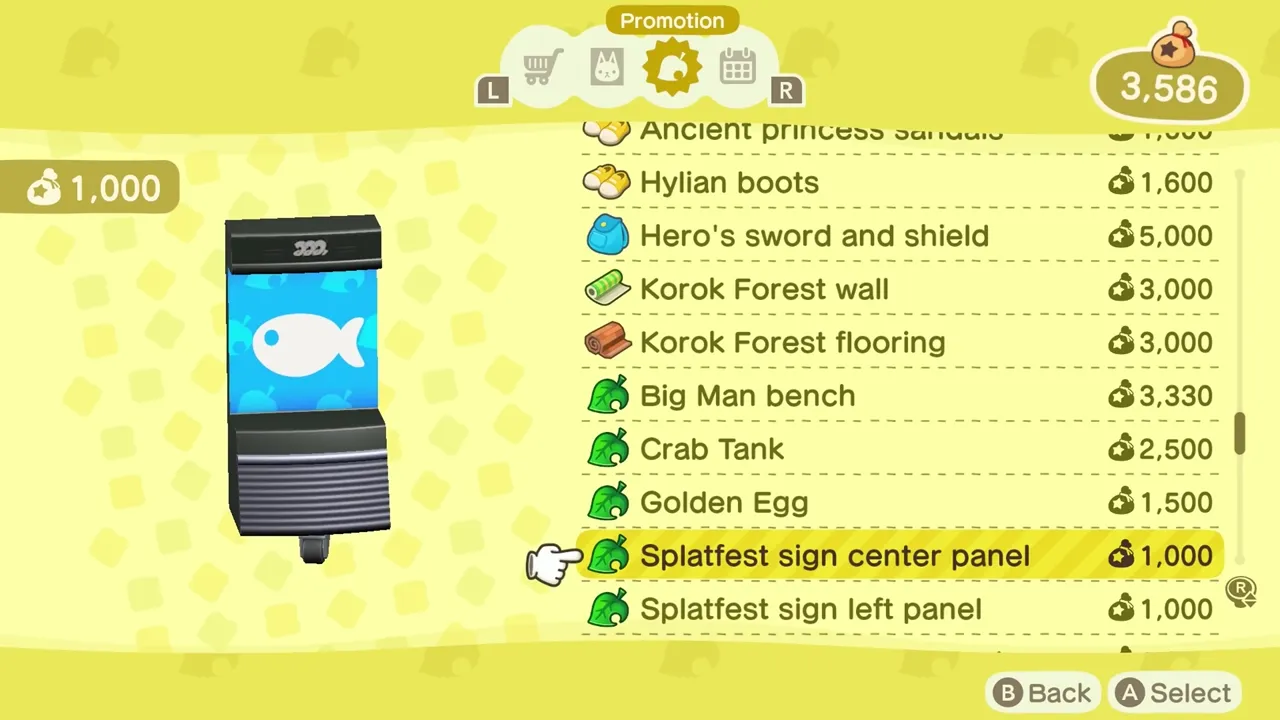
Step 3: Order the Items
Once the items are in the Promotion tab, order them like normal Nook Shopping catalog items.
The main limit is the normal catalog order cap: you can only order a small number of Nook Shopping items per day, commonly five. If you want every Zelda and Splatoon item, plan to order them across multiple days.
You will not receive most catalog orders instantly. Check your mailbox after the delivery cycle, then open or place the delivered items from your pockets.
Zelda Item List and Prices
The Zelda set has 28 checked Nook Shopping items. The names and buy prices below were checked against Nookipedia's New Horizons item tables, which cite the community Data Spreadsheet for Animal Crossing: New Horizons.
| Item | Type | Buy price |
|---|---|---|
| Decayed Guardian | Furniture | 3,000 Bells |
| Fairy bottle | Furniture | 1,000 Bells |
| Goddess Statue | Furniture | 2,500 Bells |
Showing 3 of 28 Zelda items.
Splatoon Item List and Prices
The Splatoon set also has 28 checked Nook Shopping items.
| Item | Type | Buy price |
|---|---|---|
| Big Man bench | Furniture | 3,330 Bells |
| Crab Tank | Furniture | 2,500 Bells |
| Golden Egg | Furniture | 1,500 Bells |
Showing 3 of 28 Splatoon items.
Price note: some third-party guides list the Ink tank at 2,300 Bells, but Nookipedia's data-spreadsheet-backed New Horizons table lists it at 2,500 Bells. This article uses the Nookipedia value.
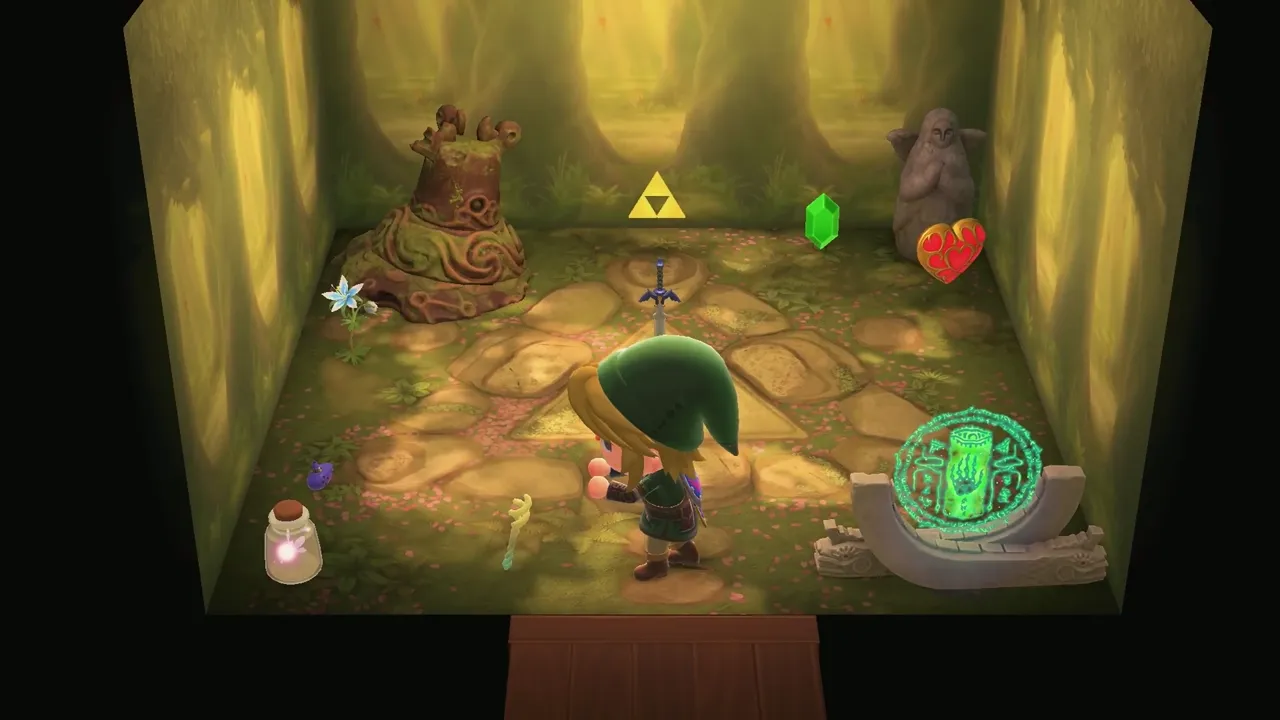
Do You Need to Move In Tulin, Mineru, Cece, or Viché?
No, not for the shopping items.
Moving in the crossover villagers uses the normal campsite process: complete three campsite requests with the same compatible amiibo, then keep talking until the move-in dialogue appears. The visits do not have to happen on consecutive days. That is useful if you want the villager as a resident, but the item unlock flow is faster: scan the compatible figure, then check Nook Shopping.
If your goal is only furniture and clothing, focus on the catalog:
- Scan the compatible figure.
- Confirm the camper call succeeds.
- Open Nook Shopping.
- Check Special Goods → Promotion.
- Order up to the daily limit.
Why Are My Zelda or Splatoon Items Missing?
Use this checklist before assuming the amiibo does not work:
| Problem | What to check |
|---|---|
| No Zelda or Splatoon items in Promotion | Make sure the game is updated to Ver. 3.0 or later. |
| Only Zelda items appear | Scan a compatible Splatoon figure too. |
| Only Splatoon items appear | Scan a compatible Zelda figure too. |
| The camper is not the one you expected | Check the figure group. Zelda figures map to Tulin or Mineru; Splatoon figures map to Cece or Viché; Big Man is a special Cece/Viché case. |
| The amiibo scan fails | Wait for the NFC prompt, use the correct controller touchpoint, and try another controller if needed. |
| The items are not visible right away | Open Special Goods → Promotion and scroll through existing promotional items. |
| You cannot buy everything at once | Nook Shopping has a daily order limit, so order across multiple days. |
Should You Buy a New Amiibo for Items?
If you only want the items, buy based on series first:
- Want Zelda-themed items? Get a compatible Zelda figure.
- Want Splatoon-themed items? Get a compatible Splatoon figure.
- Want flexibility between Cece and Viché? Big Man is the special Splatoon case.
If you also care about the resident, check the exact mapping before buying. A Zelda figure may map to Tulin or Mineru, and a Splatoon figure may map to Cece or Viché. The cleanest reference is the Ver. 3.0 compatibility list, which groups the figures by the visitor they invite.
Frequently Asked Questions
Can I unlock these items without amiibo?
For your own Nook Shopping Promotion unlock, no. The Zelda and Splatoon item sets are amiibo-triggered unlocks in Ver. 3.0.
Do I need the new Tulin, Mineru, Shiver, Frye, or Big Man amiibo?
No. Nintendo's compatibility list includes older Zelda and Splatoon figures too. The new figures work, but they are not the only options.
Do amiibo cards work?
Nintendo describes this Ver. 3.0 crossover as using compatible Zelda and Splatoon amiibo figures. For a reliable purchase, use an official figure from Nintendo's compatible list rather than assuming an unrelated card or third-party NFC card will behave the same way.
Do I need to invite the villager three times?
No, not for items. The three-day campsite loop is only for inviting the crossover villager to move in. The shopping items appear after a successful compatible scan.
Is this only for Animal Crossing: New Horizons - Nintendo Switch 2 Edition?
No. Nintendo's Ver. 3.0 update page says the free update can be enjoyed by players on both Nintendo Switch 2 and Nintendo Switch systems.
Sources and Useful Links
- Smiibo: ACNH Ver. 3.0 Zelda & Splatoon amiibo list
- Complete ACNH amiibo guide on Smiibo
- Nintendo: Animal Crossing New Horizons Ver. 3.0 update
- Nintendo: Ver. 3.0 amiibo compatibility update
- Nookipedia: The Legend of Zelda items in New Horizons
- Nookipedia: Splatoon items in New Horizons
- Nookipedia: The Legend of Zelda furniture series
- Nookipedia: Splatoon furniture series
- Animal Crossing World: which Splatoon & Zelda amiibo unlock what
Bottom Line
To get the Zelda and Splatoon amiibo items in Animal Crossing: New Horizons 3.0, scan a compatible figure through the Nook Stop amiibo camper flow, then shop from Nook Shopping → Special Goods → Promotion. Zelda figures unlock Zelda-themed items, Splatoon figures unlock Splatoon-themed items, and the crossover villagers are optional unless you also want them to live on your island.