smiibo.com

TOTK amiibo field guide

Tears of the Kingdom Amiibo Guide

Updated

In The Legend of Zelda: Tears of the Kingdom, amiibo unlock after you get the amiibo ability, usually about 45 minutes into the game. Scan compatible figures from the ability wheel to receive materials, weapons, rare items, and Zelda-themed paraglider fabrics. Each figure normally works once per day per Nintendo Account, while Switch 2 Edition players can track scans and earn one bonus use after ZELDA NOTES records five scans of the same compatible figure.

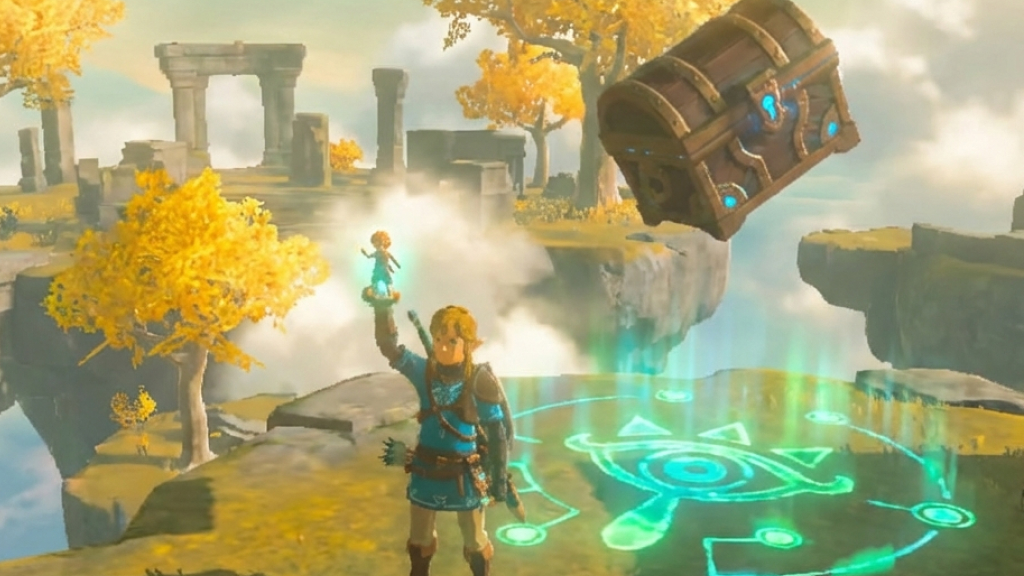
Link scanning an amiibo in Tears of the Kingdom with a reward chest dropping nearby
Amiibo rewards drop near the glowing target, so scan on clear ground before collecting materials, chests, or rare items.

Scan steps

How to Scan Amiibo in Tears of the Kingdom

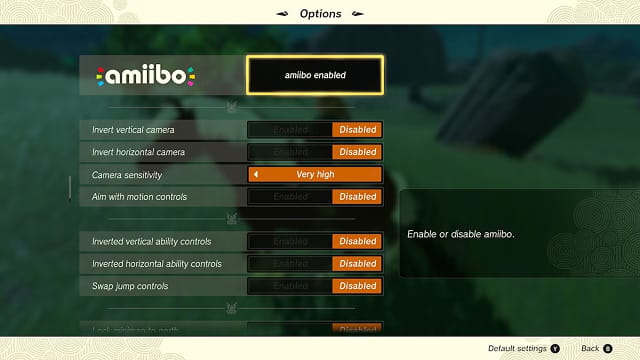
The Options menu only turns amiibo on. The scan itself happens during gameplay through Link's ability wheel.

  1. 01

    Progress until the amiibo ability unlocks

    Nintendo says this usually happens about 45 minutes into gameplay. Do not rely on a shrine-specific unlock claim.

  2. 02

    Open the Pause Menu

    Press + to open the Pause Menu. This is only for setup.

  3. 03

    Move to the System Menu

    Use R to reach the System Menu, then open Options.

  4. 04

    Enable amiibo in Options

    Turn on the amiibo setting. If it is missing, the ability likely has not unlocked yet.

    Tears of the Kingdom Options menu with amiibo enabled
    Enable amiibo from the Options menu before scanning.
  5. 05

    Return to gameplay

    Stand near safe, open ground. Rewards appear near the target area.

  6. 06

    Open the ability wheel

    Hold L during gameplay to open Link's ability wheel.

  7. 07

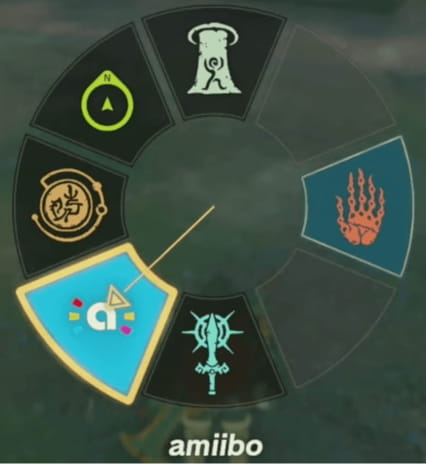
    Choose the amiibo icon

    Select the amiibo icon and release L. A glowing indicator appears on the ground.

    Tears of the Kingdom ability wheel with the amiibo icon selected
    Select the amiibo icon from Link's ability wheel.
  8. 08

    Aim the glowing indicator

    Move the target to valid ground. Materials, chests, weapons, or rare rewards can drop there instead of entering your inventory directly.

  9. 09

    Touch the figure to the NFC point

    Use the right stick on Joy-Con, Joy-Con 2, or Switch Lite. Nintendo Switch Pro Controllers scan at the top-center Nintendo Switch logo; if wired mode disables NFC, switch to wireless or use a Joy-Con.

  10. 10

    Collect the result

    Pick up materials, open any chest, and check for weapons, rare items, or fabric. Random rewards may require later scans.

Community picks

Best Amiibo to Use

Full compatibility list

Most recommended first scans

These are the picks that show up most consistently in reward guides and community discussions: Epona, Fierce Deity, Awakening, and other high-value classic Zelda targets.

Show 1 more

Strong classic gear scans

These are not always amiibo-exclusive in Tears of the Kingdom, but players still value them because they can roll recognizable classic gear, weapons, and matching fabrics early.

Show 2 more

Rewards

Rewards and Special Unlocks

Amiibo Scan Rules

The rules that matter after you unlock scanning: daily limits, reward scope, Switch 2 bonus use, Epona, ZELDA NOTES, and the full Smiibo list.

Unlock timing

Usually about 45 minutes

Nintendo says scanning becomes available after the amiibo rune is unlocked.

Daily limit

Once per day per Nintendo Account

Applies per compatible amiibo figure.

Switch 2 Edition

Bonus use available

After five recorded scans of the same compatible amiibo, ZELDA NOTES rewards one bonus use for that figure. Do not read this as same-day repeat scanning.

Zelda-related compatible amiibo

Special rewards

Nintendo calls out The Legend of Zelda series amiibo; Smiibo also includes Zelda-character Smash figures in local compatibility data.

Other amiibo

Not verified for special rewards here

Do not expect fabric, rare-item, or Epona rewards from other amiibo unless compatibility data confirms a specific feature.

Epona

Limited amiibo reward

Smiibo data maps Epona to Super Smash Bros. Link and Twilight Princess Link.

Random rewards

Yes

Some items only appear randomly; try again another day if a special reward does not appear.

Full list

Game page

Use the full Tears of the Kingdom game page when you need the searchable compatibility list.

Reward types

What Amiibo Can Drop

Treat amiibo rewards as a daily roll, not a guaranteed shopping list. Zelda-related compatible figures are the main scans for materials, weapons, rare items, and character-themed paraglider fabrics.

Materials

Best source
Compatibility-confirmed amiibo
What to know
Useful food, plants, monster parts, or other resources depending on the figure.

Weapons and rare items

Best source
Zelda-related compatible amiibo
What to know
A chest may drop with a weapon or rare item. The result can be random.

Paraglider fabrics

Best source
Zelda-related compatible amiibo
What to know
Character-themed fabrics are the main reason to scan compatibility-confirmed Zelda-related figures repeatedly.

Epona

Best source
Specific Link amiibo
What to know
Smiibo compatibility data maps Epona to Super Smash Bros. Link and Twilight Princess Link.

Bonus use

Best source
ZELDA NOTES on Switch 2 Edition
What to know
After five recorded scans of the same compatible amiibo, ZELDA NOTES can grant one bonus use for that figure on that day.

Rules and edge cases

Daily Limits, ZELDA NOTES, Fabrics, and Epona

Daily limit

Daily Limits Are Per Figure and Per Nintendo Account

Each compatible amiibo figure can be used once per day per Nintendo Account. Rotate Zelda-related figures daily, and try again later if a unique reward does not appear.

Fabrics

How Paraglider Fabric Rewards Work

Zelda-related compatible figures are the fabric-focused scans. Nintendo says The Legend of Zelda series amiibo can provide materials, weapons, or themed paraglider fabric.

A fabric is not guaranteed on the first scan. Nintendo notes that some items appear randomly and may need repeat scans on later days.

Switch 2 Edition

What ZELDA NOTES Adds on Switch 2 Edition

ZELDA NOTES is exclusive to the Nintendo Switch 2 Editions and does not require Nintendo Switch Online.

After ZELDA NOTES records five scans of the same compatible amiibo, it rewards one bonus use of that figure on that day. This is not unlimited scanning or same-day five-scan farming.

Epona

Which Amiibo Can Bring Epona

In the current Smiibo database, Epona is mapped to Super Smash Bros. Link and Link - Twilight Princess. Treat it as a specific compatibility feature, not a chest or fabric reward.

Troubleshooting

Why Amiibo Is Not Working

First check

Separate game setup from NFC problems

Most reported Tears of the Kingdom amiibo problems are one of two things: the amiibo ability is not ready in-game yet, or the controller never reads the NFC tag. Check the in-game flow first, then test the amiibo in System Settings if the controller stays silent.

1

Use Options, then the L Button ability wheel.

2

Aim the glowing target at clear ground.

3

If there is no read, test System Settings > amiibo.

1

Why is the amiibo setting or ability missing?

Keep progressing until the amiibo rune unlocks; Nintendo puts that at usually about 45 minutes into gameplay. After it unlocks, press +, go to System > Options, enable amiibo, return to gameplay, and check the L Button ability wheel. If the setting is missing, it is usually a progress issue rather than a broken figure.

2

Why does the scan make a sound but no reward appears?

You may be scanning before the amiibo ability is actually active, or the glowing landing target may be on invalid ground. Select amiibo from the L Button wheel, release L so the glowing indicator appears, move it to open ground away from cliffs, water, ceilings, and crowded objects, then scan again.

3

Why does nothing read on my controller?

Test whether the amiibo reads under System Settings > amiibo. If it reads there, restart Tears of the Kingdom and try the in-game flow again. If it does not read there, remove thick covers, hold the figure steady on the NFC point, test another amiibo, and test another controller so you can tell whether the issue is the tag or the controller.

4

Why can't my Pro Controller scan amiibo?

Use the Nintendo Switch or Nintendo Switch 2 logo at the top-center of the Pro Controller, not the stick. If Pro Controller Wired Communication is on while the controller is connected by USB, Nintendo says the NFC touchpoint is disabled. Turn wired communication off, scan wirelessly, or use the right Joy-Con / Joy-Con 2.

5

Why does the game say I cannot use this amiibo again today?

That is the normal daily lockout. Each compatible amiibo figure works once per day per Nintendo Account. The Switch 2 Edition ZELDA NOTES feature can add one bonus use after it records five scans of the same compatible figure; it does not turn the figure into unlimited same-day scans.

6

Why did I get food or materials instead of the fabric, weapon, or Epona?

The special result is not guaranteed on every scan. Nintendo says some amiibo items appear randomly, and community reports around fabrics and Epona match that pattern. Try the same compatible figure again on another day, and scan in a safe open area if you are trying for Epona.

7

I summoned Epona too early and lost her. What now?

Do not treat the first missed Epona as permanent. Community reports show players recovering Epona by scanning the same eligible Link amiibo again on later days, but it can take repeat attempts because the result is random. When she appears, ride to a stable and register her before doing anything risky.

8

Why did I get armor instead of something exclusive?

In Tears of the Kingdom, legacy armor and weapons can overlap with in-world rewards or amiibo drops, while the character paraglider fabrics are the key amiibo-exclusive cosmetic rewards in compatibility data. If you are checking whether a specific item is exclusive, use the full Smiibo list rather than assuming every chest item is amiibo-only.

9

Do non-Zelda amiibo, official amiibo cards, or Power-Up Bands give special rewards?

Do not buy or scan them expecting Zelda fabrics, Epona, or named Zelda reward lanes unless the compatibility list maps that item to a Tears of the Kingdom feature. Unsupported or generic scans may give ordinary materials, but the guide only promises special rewards where Smiibo data confirms them.

10

Where did the reward go after the scan?

The reward lands around the glowing target you aimed before scanning; it does not automatically enter your inventory. Aim on flat, visible ground, then look for loose materials or a chest near the target. If you scan near a slope, ledge, water, or clutter, the drop can be harder to spot.

FAQ

Tears of the Kingdom Amiibo Questions

When do amiibo unlock in Tears of the Kingdom?

Nintendo says compatible amiibo figures become usable after the amiibo rune unlocks, usually about 45 minutes into gameplay. If you are still early and cannot find the amiibo setting or the wheel icon, keep playing until the rune is available, then enable amiibo from Options.

What is the exact scan sequence?

Press +, open System > Options, and enable amiibo. Back in gameplay, hold L, choose the amiibo icon, release L, aim the glowing landing marker at clear ground, then hold the amiibo on the controller NFC point. The reward drops at the marker, so aim before you scan.

How many times can you scan an amiibo each day?

The official rule is once per compatible amiibo figure per day per Nintendo Account. Tears of the Kingdom - Nintendo Switch 2 Edition can add one ZELDA NOTES bonus use after five recorded scans of the same compatible amiibo, but the ordinary daily lockout still matters.

What does ZELDA NOTES do for amiibo?

ZELDA NOTES tracks compatible amiibo scans in the Nintendo Switch App for the Nintendo Switch 2 Edition. After five recorded scans of the same compatible figure, it can award one extra use of that figure on that day. It is optional and is not needed for standard Switch scanning.

Do you need Nintendo Switch Online for ZELDA NOTES?

No. Nintendo says ZELDA NOTES does not require a Nintendo Switch Online membership. The practical requirement is that you are using the Nintendo Switch 2 Edition support path, not that you have an Online subscription.

Which amiibo give paraglider fabrics?

Use Zelda-related compatible figures first. Nintendo says The Legend of Zelda series amiibo can provide materials, weapons, or themed paraglider fabric, and Smiibo data also maps several Zelda-character Smash figures to character-specific fabric rewards. Fabrics are random drops, so one scan is not a guarantee.

Are amiibo armor sets exclusive in Tears of the Kingdom?

No, not in the same way many players remember from Breath of the Wild. Community reward tracking and compatibility lists consistently point to paraglider fabrics as the main amiibo-exclusive cosmetic category, while many classic armor pieces can also be found in the game world. Use amiibo for faster rolls, fabrics, and Epona, not because every armor chest is otherwise impossible.

Which amiibo gives Epona in Tears of the Kingdom?

In the current Smiibo compatibility data, Epona is mapped to Super Smash Bros. Link and Link - Twilight Princess. She is a horse spawn, not a chest reward, so scan on open ground near a route to a stable and register her as soon as she appears.

Can Epona appear again if I missed or lost her?

Community reports say yes, but not reliably on demand. If you lost Epona before registering her, scan an eligible Link amiibo again on later days and expect randomness. If Epona appears, go straight to a stable instead of continuing to explore with her unregistered.

Why did I get materials instead of the special reward?

That is expected. Nintendo notes that some amiibo items only appear randomly and that repeat scans may be needed for unique rewards. If you are chasing a fabric, named weapon, or Epona, treat daily scanning as a roll rather than a checklist.

Should I register my amiibo in System Settings first?

It is not normally required just to receive Tears of the Kingdom rewards, but it is a good troubleshooting step. If the amiibo reads under System Settings > amiibo, the tag and NFC reader are probably working; if it does not read there either, test another controller or another amiibo before blaming the game.

Why is my Pro Controller not reading amiibo?

The Pro Controller NFC point is the top-center Nintendo Switch logo area. Nintendo also says the NFC touchpoint is disabled when Pro Controller Wired Communication is being used in TV mode. Turn that setting off, disconnect USB, or scan with the right Joy-Con / Joy-Con 2.

Do the Tulin, Yunobo, Sidon, Riju, and Mineru amiibo work in Tears of the Kingdom?

Yes, with release timing checked separately. The current Smiibo compatibility data maps Tulin, Yunobo, Sidon, Riju, and Mineru's Construct to material, weapon or rare-item, and fabric reward features. Mineru's Construct remains listed as upcoming until Nintendo's September 17, 2026 release date.

Do non-Zelda amiibo work?

Do not expect Zelda-specific fabrics, Epona, or named Zelda reward lanes unless Smiibo compatibility data confirms that amiibo for Tears of the Kingdom. If your goal is a specific reward, search the full compatibility page first instead of scanning random figures.

Where is the full Tears of the Kingdom amiibo compatibility list?

The full searchable list is on Smiibo's Tears of the Kingdom game page. Use that page when you need every compatible figure, reward category, and current Smiibo database mapping for planning and buying instead of the shorter guide preview shown here.

Open the full compatibility list